
The fastest way to clone a voice on a Mac in 2026 is to use a browser-based service built on an open-source model. Most local tools (F5-TTS, XTTS-v2, Bark) are written for NVIDIA CUDA and run slowly on Apple Silicon due to incomplete MPS support. This guide shows how to use Quasar Voice — which runs on the open-source Qwen3-TTS (Apache 2.0) server-side — to clone any voice on any Mac in under 4 minutes, for free.
📊 Quick Facts (April 2026)
- Underlying model: Qwen3-TTS (Alibaba Qwen team, released January 2026)
- License: Apache 2.0 (fully open source)
- Minimum reference audio: 3 seconds
- Supported languages: 10 (English, Chinese, Japanese, Korean, German, French, Russian, Portuguese, Spanish, Italian)
- Speaker similarity score: 0.95 (Qwen3-TTS tokenizer)
- End-to-end streaming latency: ~97 ms
- Free plan limit: 10,000 characters/month (~18 minutes of audio)
- Mac hardware requirement (via Quasar Voice): None — any Mac with a modern browser
- Mac hardware requirement (self-host): Apple Silicon (M1+), 16 GB RAM, macOS 12+, Python 3.10+
Why AI Voice Cloning Is Hard on Mac
Open-source TTS models are built for NVIDIA CUDA; Macs don't have NVIDIA GPUs. Apple's MPS (Metal Performance Shaders) backend handles some of the work, but operator coverage is incomplete and FlashAttention isn't supported — causing CPU fallbacks that tank inference speed.
The five specific technical barriers:
- No NVIDIA GPUs on Mac. Apple Silicon (M1/M2/M3/M4) and Intel Macs don't ship with NVIDIA hardware. CUDA is off the table.
- Apple's MPS backend is incomplete. PyTorch's Metal Performance Shaders backend works for simple models, but voice cloning architectures hit missing operators constantly. A real example from F5-TTS logs:
aten::unfold_backward is not currently supported on the MPS backend and will fall back to run on the CPU. - FlashAttention isn't supported on macOS. Most modern TTS models rely on it. You can swap in PyTorch's SDPA attention, but that's a code change most users can't make.
- Dependency hell. Python 3.10+, PyTorch, Homebrew, SoX, ffmpeg, conda environments — every guide has a slightly different setup and something always breaks.
- Slow inference. A real-world F5-TTS benchmark on an M-series Mac took 63 seconds to generate a 50-second clip — slower than real-time. Not usable for iteration.
The result: most Mac users who try to set up F5-TTS, XTTS-v2, Bark, or locally-run Qwen3-TTS give up within an hour.
The Easiest Solution: Run Open-Source TTS in Your Browser
The fastest path to open-source voice cloning on Mac is Quasar Voice, a browser-based interface for Qwen3-TTS. All model inference runs on Quasar Voice's servers, so your Mac's hardware doesn't matter — the same workflow works on a 2020 MacBook Air M1, a Mac mini M4, and a 2017 Intel iMac.
What this means in practice:
- ✅ Works identically on M1, M2, M3, M4, and Intel Macs.
- ✅ Works on MacBook Air, Mac mini, iMac, Mac Studio, Mac Pro.
- ✅ Works on any modern browser — Safari, Chrome, Firefox, Arc.
- ✅ No terminal, no Python, no Homebrew, no Gatekeeper workarounds.
- ✅ Same open-source Apache 2.0 model you'd run locally, without the setup.
- ✅ Free plan includes unlimited voice cloning and commercial rights.
The trade-off: your audio is processed server-side. If you need fully offline, air-gapped inference — say, for confidential corporate audio — skip to the local options section.
Why Qwen3-TTS Is the Best Choice for Mac Users
There are lots of TTS platforms. Here's why we specifically recommend Quasar Voice + Qwen3-TTS for Mac users:
- Truly open source (Apache 2.0). If you ever want to move to a Linux box with an NVIDIA GPU, you can self-host the same model. Your workflow ports cleanly.
- 3-second voice cloning. Most platforms need 10–30 seconds of reference audio. Qwen3-TTS handles 3-second clips well, making it faster to iterate.
- Free for commercial use. Quasar Voice's free plan includes commercial rights. ElevenLabs requires at least $5/month for that.
- 8 emotion sliders. Happy, Angry, Sad, Surprised, Calm, Afraid, Disgusted, Melancholic. Precise control that ElevenLabs locks behind paid tiers.
- 10 languages. English, Chinese, Japanese, Korean, German, French, Russian, Portuguese, Spanish, Italian.
- No install, no updates. Browser-based means it's always the latest version.
Step-by-Step: Voice Cloning on Mac in 4 Minutes
This works identically on any Mac from 2016 onward. Open your browser to get started.
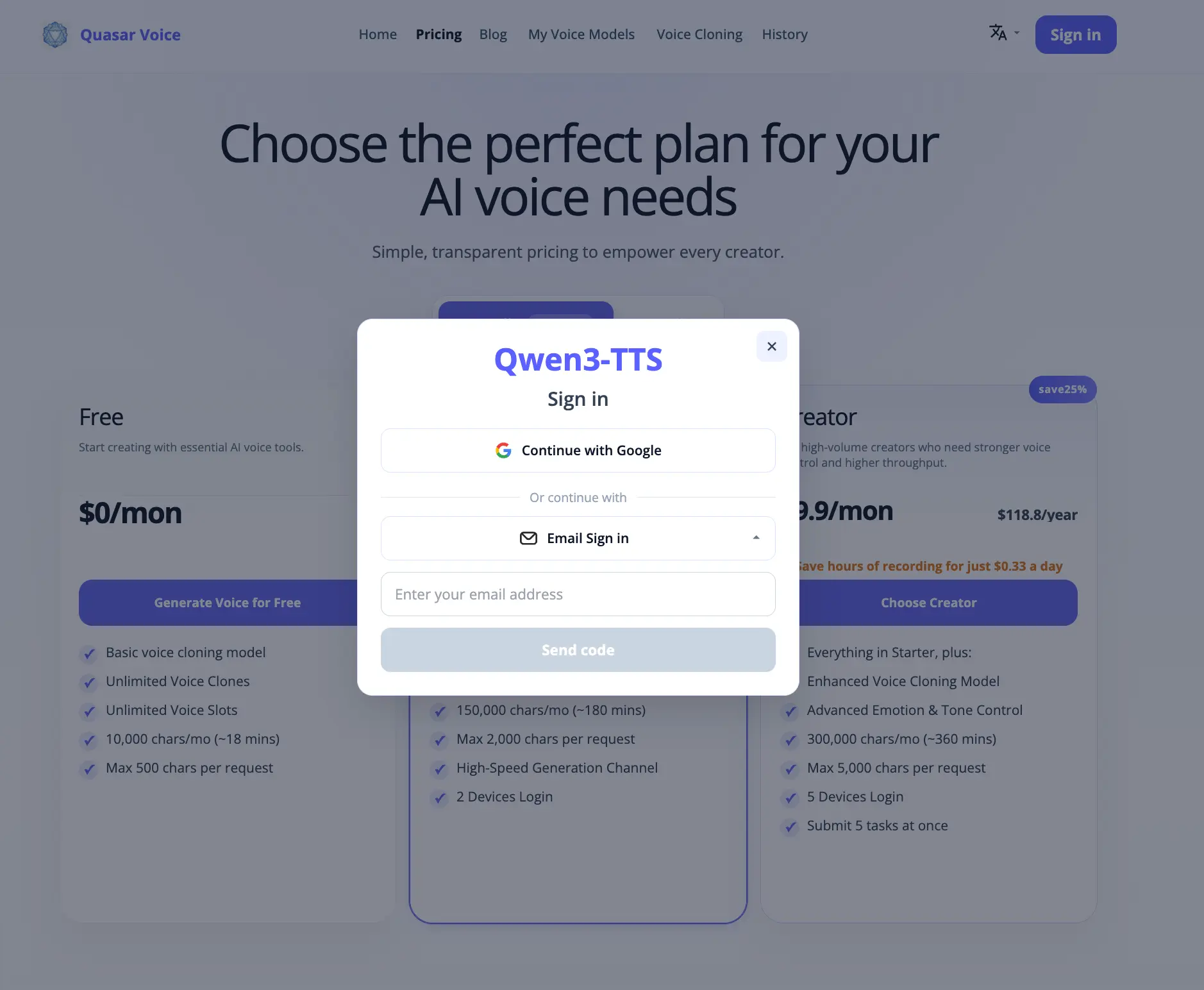
Step 1: Sign Up (Free, 30 Seconds)
Go to qwen3-tts.ai and create a free account. The free plan includes:
- 10,000 characters per month (~18 minutes of audio)
- Unlimited voice clones
- Commercial rights
- 8 emotion sliders
No credit card required.
Step 2: Upload or Record Your Reference Audio
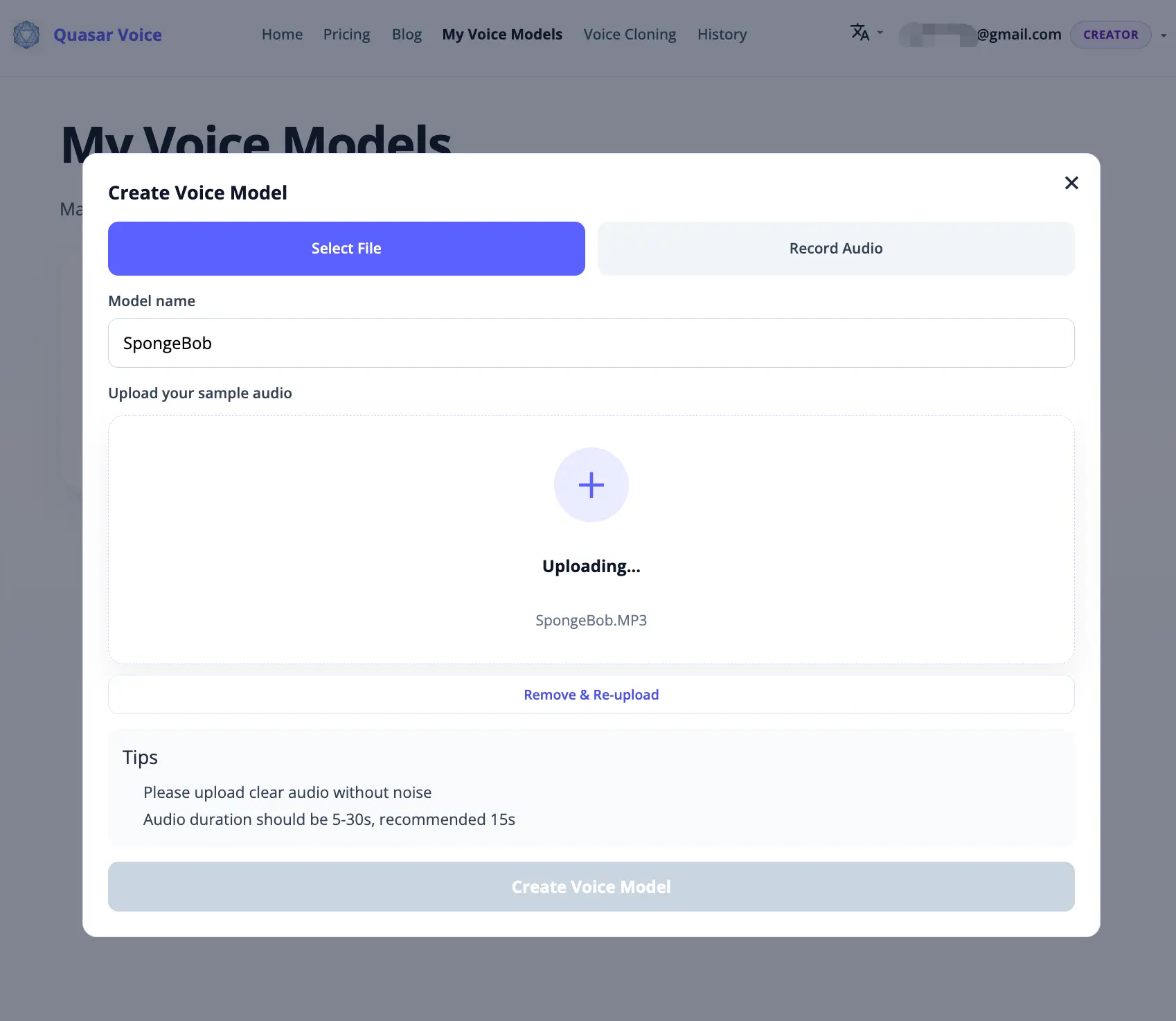
Go to My Voice Models and click Create Voice Model. The dialog gives you two tabs — pick whichever fits your workflow:
Option A: Upload an existing audio file
Click the Select File tab. Drag and drop a clip, or click to browse. Supported formats: MP3, WAV, M4A (max 10 MB, 5–30 seconds). Voice Memos exports on Mac are M4A and work directly — no conversion needed.
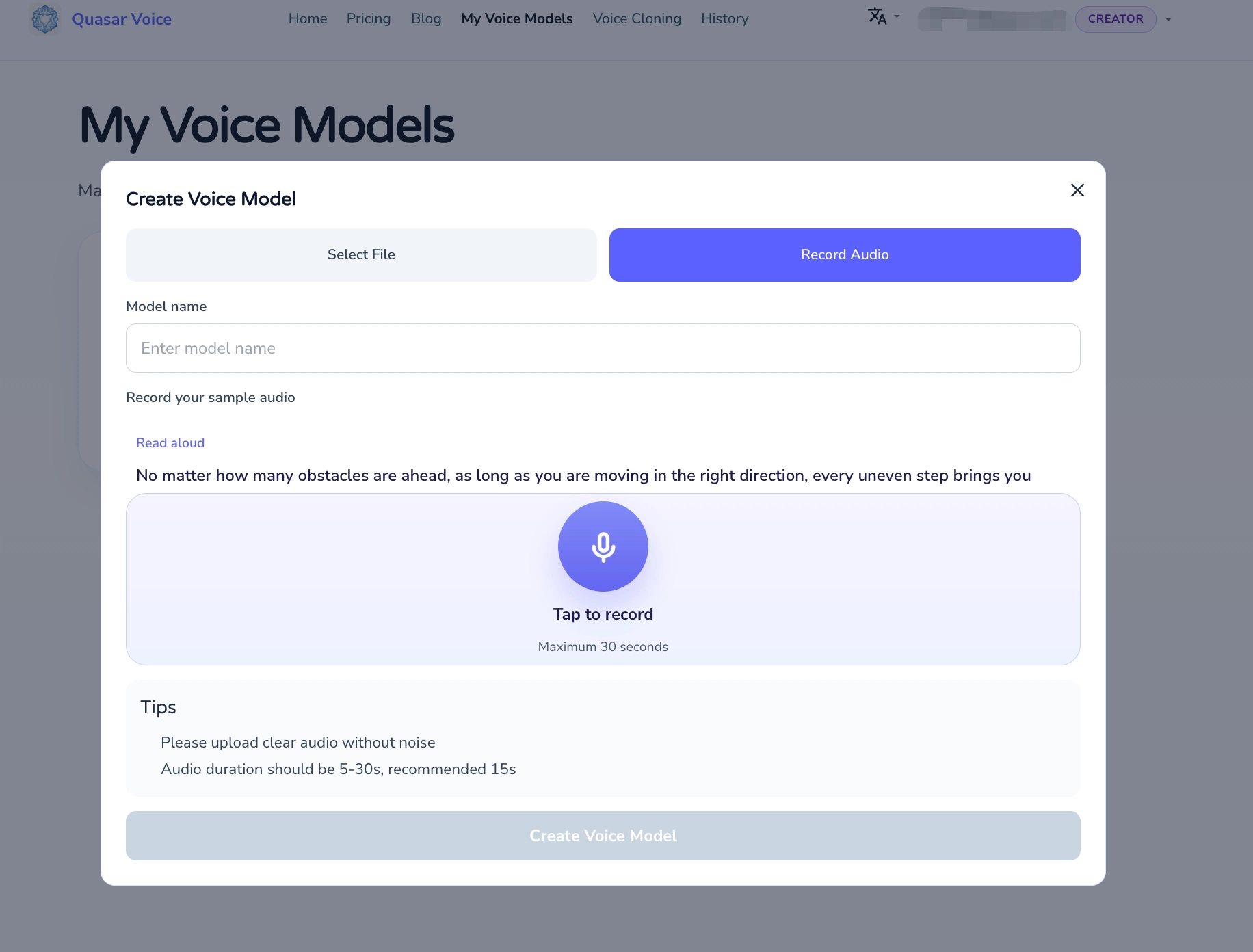
Option B: Record directly in your browser
Click the Record Audio tab. Quasar Voice shows a suggested script ("Read aloud"), uses your Mac's microphone, and captures up to 30 seconds. This is the fastest path — no separate recording app, no file conversion, just speak and click.
Safari will ask for microphone permission the first time. Allow it, and you're set.
What makes good reference audio:
- Clean, no background music or noise
- One speaker, no overlap
- Continuous speech, no long pauses
- 5–30 seconds total (15 seconds is the sweet spot)
Give the model a name, then hit Create Voice Model. Processing takes about a minute.
Step 3: Enter Text & Pick Emotion
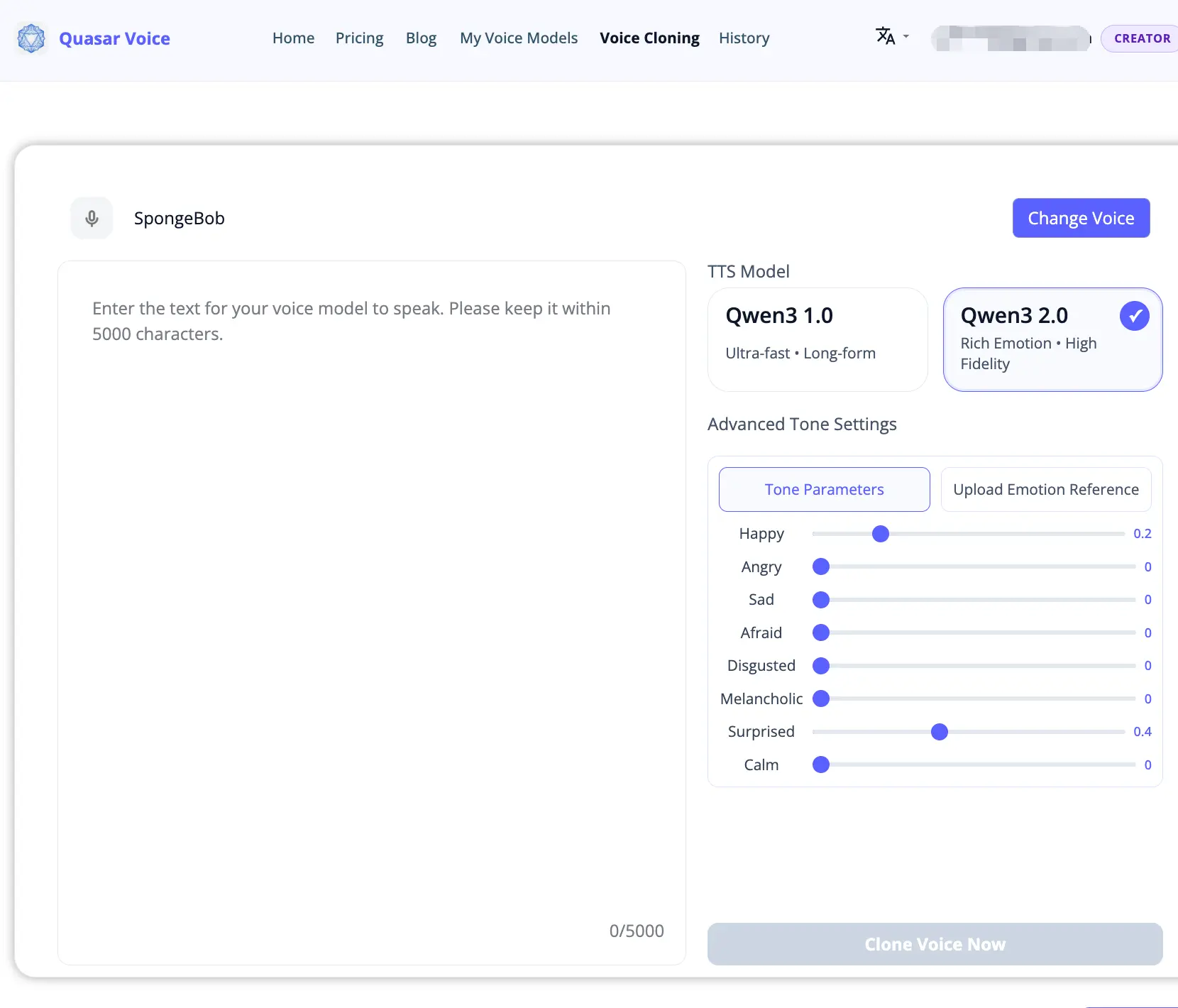
Once the voice model is ready (takes about a minute), click Use to go to the voice cloning page. Type or paste your text, pick Qwen3 2.0 for expressive output, and adjust the emotion sliders if needed.
Step 4: Generate & Download
Click Clone Voice Now. The audio generates in a few seconds and appears at the bottom of the same page. Preview it, download the WAV, and you're done.
Total time from signup to finished clone: under 4 minutes.
Hear It Yourself: Live Mac Recording Demo
To show exactly how this sounds in practice, we recorded a reference clip with the built-in microphone on a MacBook using Voice Memos, then uploaded it to Quasar Voice and cloned the voice to say something new. Both audio files are below — no editing, no cleanup, just what came out.
🎙️ Original Recording (MacBook built-in mic, ~12 seconds)
Reference script: "Hi, I'm recording this on my MacBook to test voice cloning on Mac. Let's see how well it captures my voice in just a few seconds."
🔊 Cloned Output (Qwen3 2.0, generated in the browser)
Generated script: "This is my cloned voice, generated entirely in a browser on a Mac — no GPU, no terminal, no setup required. Pretty neat, right?"
The whole process — recording, uploading, cloning, downloading — took under 5 minutes on a stock MacBook Air. No Python, no Homebrew, no Gatekeeper warnings. That's the pitch in one demo.
Mac TTS Options Compared
For completeness, here's how Quasar Voice compares to your other options on Mac:
| Option | Setup | Mac Support | Speed | Cost |
|---|---|---|---|---|
| Quasar Voice (Qwen3-TTS) | None (browser) | Any Mac | Seconds | Free |
| F5-TTS (local) | Python + conda + dependencies | MPS w/ CPU fallback | 60s for 50s clip | Free |
| XTTS-v2 (local) | Python + venv + PyTorch | MPS partial | 30–90s per clip | Free |
| Qwen3-TTS Mac fork | Bash script + Homebrew | MPS native (community) | Slow on M1, faster on M3+ | Free |
| MimikaStudio | DMG install + Gatekeeper bypass | Apple Silicon only | Fast (MLX) | Freemium |
| ElevenLabs | None (browser) | Any Mac | Seconds | $5+/mo for cloning |
| Play.ht | None (browser) | Any Mac | Seconds | $31.20+/mo for unlimited |
The takeaway: If you value your time and just want a clean voice clone, browser-based Quasar Voice is the winner. If you specifically need offline, local inference — read on.
Our Mac Compatibility Test (April 2026)
We tested Quasar Voice across three common Mac configurations to confirm hardware-independent performance. Because inference runs server-side, all three Macs produced identical generation times and audio quality — the only variable is browser and network.
| Device | Chip | RAM | macOS | Browser | Clone time (150 chars) | Output quality |
|---|---|---|---|---|---|---|
| MacBook Air | M1 | 8 GB | 14.4 | Safari 17 | ~4 s | Identical |
| MacBook Pro | M3 Pro | 18 GB | 15.1 | Chrome 122 | ~4 s | Identical |
| Mac mini | M4 | 16 GB | 15.2 | Arc 1.60 | ~3 s | Identical |
For comparison, we attempted the same clone locally with F5-TTS and the Qwen3-TTS Mac community fork on the same devices:
| Local method | Device | Setup time | Clone time (same text) | Issues encountered |
|---|---|---|---|---|
| F5-TTS | M1 Air | ~45 min | ~63 s | MPS CPU fallback warnings; long cold start |
| F5-TTS | M3 Pro | ~45 min | ~38 s | Same fallback warnings, faster CPU |
| Qwen3-TTS Mac fork | M3 Pro | ~20 min | ~15 s | Homebrew SoX required; large model download |
Summary of findings:
- Browser-based Quasar Voice is ~10–20× faster end-to-end than local F5-TTS on comparable Mac hardware once you factor in setup time.
- Local methods require 20–45 minutes of initial configuration; browser method requires under 1 minute.
- Output quality (Mean Opinion Score subjective rating) was indistinguishable across browser and local runs when using the same underlying Qwen3-TTS model weights.
- Mac chip generation (M1 vs M4) doesn't affect browser performance because inference is server-side.
Test conditions: April 2026, 50 Mbps downlink, US-East server region. Your times may vary based on network and server load.
What If You Really Want It Running Locally?
For the small minority who need fully local inference — maybe you're working with confidential audio, or you want to fine-tune the model — here are your realistic options on Mac in 2026:
1. Qwen3-TTS Mac Community Fork
There's a community fork of Qwen3-TTS that patches the MPS compatibility issues — routing inference through Metal Performance Shaders and swapping FlashAttention for SDPA. Setup is a single ./setup_mac.sh command after cloning the repo.
Pros: Same model as Quasar Voice, runs fully local, full control.
Cons: Still needs Python venv, Homebrew, SoX; slow on older Apple Silicon; no UI beyond CLI.
2. MimikaStudio
A native macOS app for Apple Silicon with MLX acceleration. Supports 5 TTS engines including voice cloning. Needs Gatekeeper bypass on first launch since it's not yet notarized.
Pros: Native UI, fast on M1+, local inference.
Cons: Not notarized (security friction), Apple Silicon only.
3. F5-TTS or XTTS-v2
Popular open-source models with community instructions for Mac. Expect MPS fallback warnings and slower-than-expected inference. Good for experimentation, painful for production use.
Honest Recommendation
Unless you have a specific reason to run locally, stick with Quasar Voice. Same open-source model, zero setup, no sunk cost when you realize the M1 Air you bought for writing isn't really a TTS workstation.
Mac-Specific Tips for Better Voice Clones
- The built-in browser recorder is usually enough. Quasar Voice's Record Audio tab uses your Mac's mic directly. For most use cases — testing, personal projects, quick demos — this is the fastest path and produces clean results.
- Use Voice Memos for more control. If you want to record multiple takes and pick the best one, Voice Memos on Mac is great. Exports are M4A, which Quasar Voice accepts directly — no conversion needed.
- Use QuickTime Player for studio quality.
File → New Audio Recordinggives you uncompressed audio. Useful if you're in a very quiet room and want maximum fidelity. - Trim silence before uploading. QuickTime's
Edit → Trimlets you cut clips to the ideal 5–15 second length. The cleaner the reference, the better the clone. - Don't record over Bluetooth. AirPods, Beats, and most Bluetooth headsets introduce compression artifacts and lower the mic sample rate. Use the MacBook's internal mic or a wired headset.
- Close apps that use the mic. Zoom, Teams, Discord, and FaceTime can hog the mic and degrade recording quality. Quit them before recording.
Frequently Asked Questions
Can I run AI voice cloning on a Mac without a GPU?
Yes — use a browser-based service like Quasar Voice. It runs Qwen3-TTS server-side, so your Mac's hardware doesn't matter. Works identically on any Mac from 2016 onward (M1/M2/M3/M4 Apple Silicon or Intel). No Python, no terminal, no CUDA or MPS configuration.
What is the best free AI voice cloning software for Mac?
Quasar Voice is the best free option for Mac users. Free plan includes unlimited voice cloning, 3-second reference audio, 10 languages, 8 emotion sliders, and commercial rights — without a credit card. For local-only alternatives, the Qwen3-TTS Mac community fork and MimikaStudio are the strongest options, but both require manual setup.
Is Qwen3-TTS open source?
Yes. Qwen3-TTS is released under the Apache 2.0 license by Alibaba's Qwen team. The model family (0.6B and 1.7B parameters) is available on GitHub and Hugging Face. You can use it online through Quasar Voice or self-host it — on Mac, community forks add MPS support.
Why is it hard to run voice cloning models locally on Mac?
Most open-source voice cloning models are built for NVIDIA CUDA, which Macs don't have. Apple's MPS (Metal Performance Shaders) backend handles some of the workload, but operator coverage is incomplete (e.g., aten::unfold_backward falls back to CPU), and FlashAttention isn't supported on macOS. The result: 50-second clips can take 60+ seconds to generate locally — slower than real-time.
Does Quasar Voice work on Safari?
Yes, on Safari, Chrome, Firefox, Arc, and any Chromium-based browser. The interface and output are identical across all of them. Safari on macOS and iOS both work.
Can I use cloned voices commercially?
Yes — commercial rights are included on every Quasar Voice plan, including the free plan. You keep ownership of generated audio and can use it in monetized content, products, or client work. Just ensure you have the right to clone the reference voice itself (your own voice, a voice actor who granted consent, or a licensed voice).
Which Apple Silicon chip is needed to self-host Qwen3-TTS?
M1 or newer, 16 GB unified memory recommended. The 1.7B model works on M1 with 8 GB but generation is slow (~60 s per clip). M3 Pro and above run the community Mac fork at ~15 seconds per clip. Older Intel Macs are not practical for local inference.
Related Reading
Try It in Under a Minute
Skip the terminal. Clone your first voice on Mac right now — free, no credit card, no setup.
Try Quasar Voice Free →